Geomagic Design X
Advanced Scan-to-CAD Reverse Engineering Software
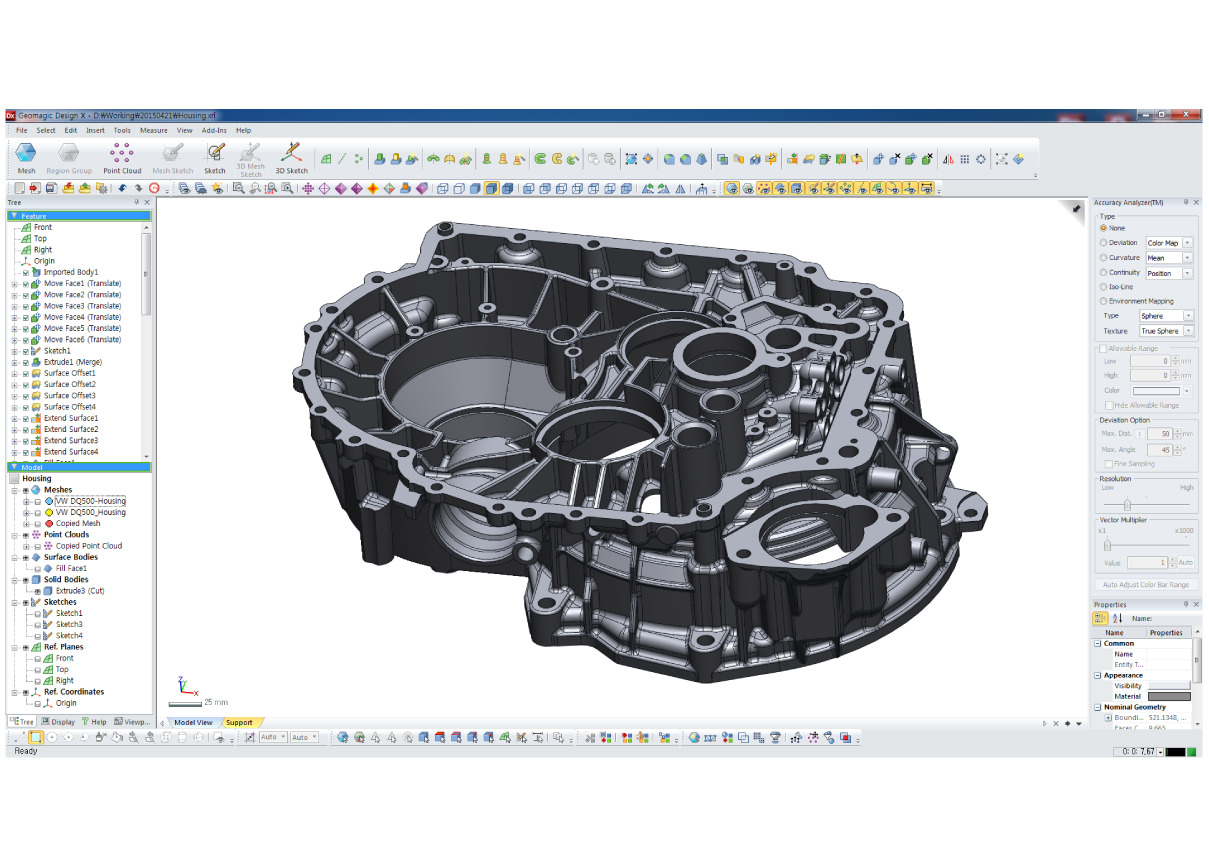
Geomagic Design X is a professional reverse engineering software solution built for converting 3D scan data into accurate, editable, feature-based CAD models. Designed for engineers, manufacturers, product developers, and reverse engineering specialists, Design X combines powerful 3D scan data processing with history-based CAD modeling tools to help users move from physical part to manufacturing-ready digital design.
Instead of treating scan data as a static mesh, Geomagic Design X allows users to reconstruct parts with true CAD features, surfaces, sketches, and solid modeling tools. This makes it an ideal solution for recreating legacy components, redesigning existing products, modifying physical parts, and building accurate CAD models when original design files are unavailable.
From Physical Part to Editable CAD Model
3D scanning is an essential first step in reverse engineering, but scanned mesh data often needs to be converted into usable CAD geometry before it can support design, manufacturing, or engineering workflows. Geomagic Design X is designed specifically for this process, giving users the tools needed to import scan data, clean and process meshes, extract design features, reconstruct surfaces, and create editable CAD models.
This workflow helps bridge the gap between physical objects and digital design environments. Users can scan an existing part, bring the data into Design X, rebuild the model with CAD intelligence, and export the result into their preferred CAD platform for further design work, manufacturing preparation, or documentation.
Built for Professional Reverse Engineering
Geomagic Design X is widely used in reverse engineering workflows where accuracy, control, and design intent matter. The software supports both automatic and guided modeling approaches, allowing users to choose the best method for the part they are working with.
For mechanical components with recognizable engineering geometry, Design X can help extract features such as planes, cylinders, cones, holes, slots, and other common CAD elements from scanned data. For more complex or organic shapes, the software includes powerful surfacing tools that allow users to recreate smooth, accurate geometry from irregular scan data.
This combination makes Design X useful across a wide range of applications, from industrial components and automotive parts to tooling, molded products, castings, consumer goods, and legacy equipment.
History-Based CAD Modeling
One of the major advantages of Geomagic Design X is its history-based CAD environment. Models can be built with editable features, sketches, and parametric design steps, giving users more control than a simple mesh conversion workflow.
This allows engineers to create models that behave more like traditional CAD files. Features can be adjusted, dimensions can be refined, and design changes can be made after the model has been reconstructed. For teams that need usable engineering data rather than just a surface mesh, this is a major advantage.
Accurate Surface Fitting and Hybrid Modeling
Geomagic Design X combines solid modeling, surface modeling, and mesh processing tools in a single workflow. This hybrid approach allows users to recreate both prismatic mechanical features and complex freeform surfaces within the same project.
For parts with clean manufactured geometry, users can rebuild precise CAD features that reflect the original design intent. For more complex scanned shapes, Design X provides surface fitting tools that help generate accurate geometry directly from the scan. This flexibility makes it possible to handle parts that include both engineered features and organic surface transitions.
Mesh Processing and Scan Data Preparation
Before a scanned part can be converted into CAD, the scan data often needs to be prepared. Geomagic Design X includes mesh editing and point cloud processing tools that help users clean, repair, simplify, and organize scan data before reconstruction begins.
These tools are especially useful when working with large scan files, noisy data, incomplete surfaces, or complex geometry. By improving the scan data before modeling, users can create cleaner CAD geometry and maintain better accuracy throughout the reverse engineering process.
Deviation Analysis for Model Verification
Geomagic Design X allows users to compare reconstructed CAD geometry against the original scan data. This visual feedback helps verify that the recreated model accurately represents the physical part.
Deviation analysis is especially important in reverse engineering because it allows users to balance accuracy with design intent. A model may need to match the scanned part closely, or it may need to be cleaned up and idealized for manufacturing. Design X gives users the feedback needed to make those decisions with confidence.
Designed to Work with Existing CAD Workflows
Geomagic Design X is built to support professional CAD environments. Once a model has been reconstructed, users can export CAD data for use in downstream engineering, design, and manufacturing software.
This makes Design X valuable for teams that already work in CAD systems but need a better way to bring real-world physical parts into their digital workflow. Whether the goal is redesign, replacement part creation, documentation, tooling, or manufacturing preparation, Design X helps turn scanned data into usable engineering geometry.
Ideal Applications
Geomagic Design X is well suited for reverse engineering, product redesign, legacy part reconstruction, replacement part creation, tooling and fixture development, manufacturing documentation, casting and mold reconstruction, automotive part development, industrial equipment repair, and scan-based product design.
It is especially useful when original CAD files are missing, outdated, inaccurate, or unavailable. By starting with a real physical part, users can create new digital models that support modern engineering and manufacturing workflows.
Key Features
| Feature | Description |
|---|---|
| Scan-to-CAD Workflow | Converts 3D scan data into editable CAD models |
| History-Based CAD Modeling | Builds models with editable features, sketches, and design history |
| Mesh and Point Cloud Processing | Cleans, repairs, and prepares scan data for reverse engineering |
| Automatic and Guided Modeling | Supports both automated workflows and user-controlled reconstruction |
| Primitive Feature Extraction | Reconstructs planes, cylinders, cones, holes, and other mechanical features |
| Surface Fitting Tools | Creates accurate surfaces from complex and organic scan data |
| Hybrid Modeling Environment | Combines mesh processing, solid modeling, and surface modeling |
| Deviation Analysis | Compares CAD geometry against the original scan for accuracy verification |
| CAD Export Workflow | Supports downstream use in professional design and manufacturing software |
Why Choose Geomagic Design X?
Geomagic Design X is built for users who need more than a mesh. It gives engineers and manufacturers a complete scan-to-CAD workflow for turning physical parts into editable, accurate, and production-ready digital models.
By combining 3D scan data processing, history-based CAD modeling, surface reconstruction, feature extraction, and deviation analysis, Design X provides a powerful reverse engineering environment for professional product development and manufacturing workflows.
For companies using 3D scanning to recreate, improve, or document existing parts, Geomagic Design X provides the tools needed to move confidently from real-world geometry to usable CAD data.