

EinScan SP V2
Professional Desktop 3D Scanning for Education, Museums, Creators, and Digital Archiving
The EinScan SP V2 is a desktop 3D scanner designed to make high-quality 3D digitization simple, fast, and accessible. Built around an automated structured-light scanning system, it enables users to capture detailed 3D models of physical objects with minimal setup and training.
Unlike complex industrial systems, the SP V2 focuses on ease of use and repeatability. It is especially well suited for environments where users need consistent, reliable results across a wide range of objects such as sculptures, artifacts, collectibles, educational specimens, and product visuals.
This makes it a strong fit for classrooms, museums, makerspaces, design studios, and digital content workflows.
Automated Desktop Scanning Workflow
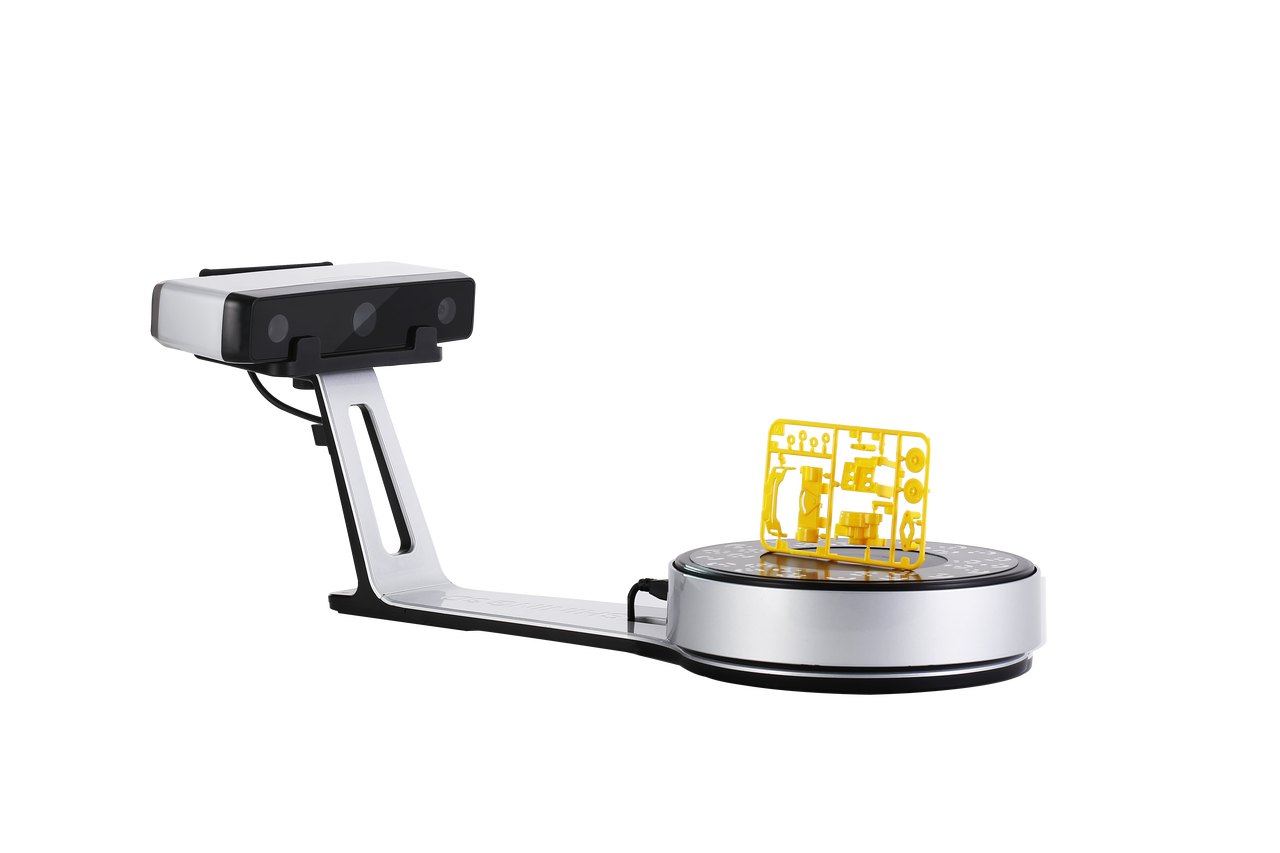
At the core of the SP V2 experience is its integrated turntable-based scanning system. Users can place an object on the platform, select a scanning mode, and let the system automatically capture the object from multiple angles.
This automation removes much of the manual effort typically associated with 3D scanning. Instead of repositioning objects repeatedly, the scanner handles alignment and multi-angle capture through a guided workflow.
The result is a smoother and more predictable scanning process, particularly useful for environments where multiple users or students need to operate the system.

High-Detail Structured-Light Capture
The EinScan SP V2 uses white-light structured-light technology to project patterns onto an object and reconstruct its geometry in 3D. This method enables it to capture fine surface detail, smooth curvature, and complex shapes with strong visual clarity.
It performs especially well on objects with visible surface features such as carvings, textures, and sculpted forms. The resulting models are suitable for visualization, digital archiving, and 3D printing workflows where visual fidelity is more important than engineering-grade measurement precision.

Fast Scanning and Efficient Processing
The SP V2 is designed for speed and efficiency in everyday scanning environments. Individual scans are captured in seconds, while full automated turntable sessions can complete in under a minute depending on object size and resolution settings.
This fast turnaround makes it practical for batch digitization workflows, where multiple objects need to be scanned in a single session. It is especially valuable in education and museum environments where time efficiency is important.
Flexible Scanning Modes
The SP V2 supports multiple scanning approaches to accommodate different object sizes and workflows.
In automatic mode, the scanner uses the turntable to capture full 360-degree models with minimal user input. This is ideal for small to medium-sized objects and provides the most streamlined experience.
For larger objects that do not fit on the turntable, fixed scanning mode allows users to reposition the object manually and capture multiple datasets. These scans can then be aligned and combined within the software.
This flexibility allows the SP V2 to support both structured classroom workflows and more open-ended creative projects.
Designed for Education and Learning Environments
One of the strongest use cases for the SP V2 is education. Its simple workflow and guided scanning process make it easy for new users to understand the basics of 3D digitization without requiring technical expertise.
Students can quickly learn how physical objects are transformed into digital models, while instructors can integrate scanning into lessons covering design, engineering fundamentals, digital fabrication, and cultural documentation.
Because the system is consistent and repeatable, it works well in shared environments where multiple users interact with the same equipment.
Museum and Cultural Heritage Digitization
The EinScan SP V2 is also well suited for museums, archives, and cultural institutions looking to create digital records of artifacts.
Its ability to capture detailed surface geometry makes it useful for documenting sculptures, historical objects, and preserved materials. These digital models can be used for archival storage, virtual exhibitions, educational materials, or public engagement initiatives.
The non-contact nature of structured-light scanning also helps preserve delicate or fragile objects during digitization.

Creative and Digital Content Applications
Beyond education and preservation, the SP V2 is widely used in creative industries and content production workflows.
Artists and designers can digitize physical sculptures or prototypes for visualization and iteration. Makers and hobbyists can convert real-world objects into 3D printable models. E-commerce and product teams can generate accurate digital representations for online display or marketing content.
Its desktop format makes it especially convenient for studio environments where space and workflow simplicity matter.
Reliable Desktop Form Factor
The SP V2 is designed as a stable, fixed desktop scanning system. Unlike handheld scanners that require constant movement, it keeps both the object and scanning environment controlled and consistent.
This improves repeatability and reduces user error, especially in shared or high-turnover environments such as classrooms, labs, and workshops.
Its compact footprint also allows it to integrate easily into existing desks or production spaces without requiring specialized infrastructure.
Ideal Applications
The EinScan SP V2 is particularly well suited for:
- Education and STEM training
- Museum and cultural heritage digitization
- Digital archiving projects
- Art and sculpture scanning
- Collectibles and figurines
- Makerspaces and fabrication labs
- Product visualization and content creation
- 3D printing workflows
- Research documentation
- Creative studio work
Technical Specifications
|
Scan Mode |
Fixed Scan |
Auto Scan |
|
Mode of Alignment |
Feature, Markers, Manual |
Turntable, Markers, Manual, Turntable Coded Targets |
|
Single Shot Accuracy |
<=0.05 mm |
<=0.05 mm |
|
Minimum Scan Volume |
30x30x30 mm |
|
|
Maximum Scan Volume |
1200x1200x1200 mm |
200x200x200 mm |
|
Range of Single Capture |
200x150 mm |
|
|
Scan Speed |
< 1s |
<45s |
|
Point Distance |
0.17 mm ~ 0.2 mm |
|
|
Texture |
Yes |
|
|
File Format |
OBJ, STL, ASC, PLY |
|
|
Camera Resolution |
1.3 Mega Pixels |
|
|
Light Source |
White Light |
|
|
Stand-off Distance |
290~480 mm |
|
|
Computer Requirements |
Nvidia series(GTX 660 or higher) Graphic Memory>2GB, 1 ×USB 2.0 or 3.0, Win11, Win10 (64 bit), Apple Mac OS, Dual-core i5 orhigher, System Memory>16 GB |
|
|
Weight (unpacked) |
4.2 kg |
|
|
Weight (packed) |
7.0 kg |
|
|
Dimension |
570 x 210 x 210 mm |
|
|
Power Supply |
50 w |
|
|
Input Voltage |
DC, 12 x 3.33 A |
|
|
Calibration Board |
HD |
|
|
Turntable |
Turntable with markers |
|
|
Load Capacity of Turntable |
5 kg |
|